How to Read Solar Inverter Fault Codes: A Universal Guide for Any Brand
Inverter error codes look cryptic, but almost every brand groups them into the same handful of categories. Learn to decode any fault code, use the event log, and decide what you can check yourself.
Every inverter manufacturer has its own fault code system. One brand shows a short number, another a code with a letter prefix, another a plain-English message, and many apps translate codes into phrases that differ from the manual. If you work with more than one brand — or you've just inherited a system with no documentation — this can be bewildering.
The good news is that underneath the different numbering, almost every grid-tie and hybrid inverter monitors the same physical quantities and protects against the same conditions. Once you know the categories, you can make sense of almost any code, decide how urgent it is, and know where to look first.
Quick answer
Fault codes fall into a few families: PV/DC side (voltage, insulation, arc), grid/AC side (voltage, frequency, loss of grid), residual current, temperature, internal hardware (relays, bus voltage, sensors), battery/BMS (hybrids only) and communication. Identify the family, check the timing and frequency in the event log, then follow the matching guide. Always confirm the exact meaning in the manufacturer's manual for your model.
Why codes differ, but faults don't
Inverters must meet the same safety and grid connection standards. The protection functions those standards require — anti-islanding, voltage and frequency limits, insulation monitoring, residual current monitoring, DC injection limits — are common to every certified product. So whether the screen says a numeric code or "Grid Overvoltage", the inverter is reacting to the same kind of measured condition.
Where brands differ is in how they number codes, how much detail they show, and whether a fault is self-clearing or requires a manual reset.
The main fault families
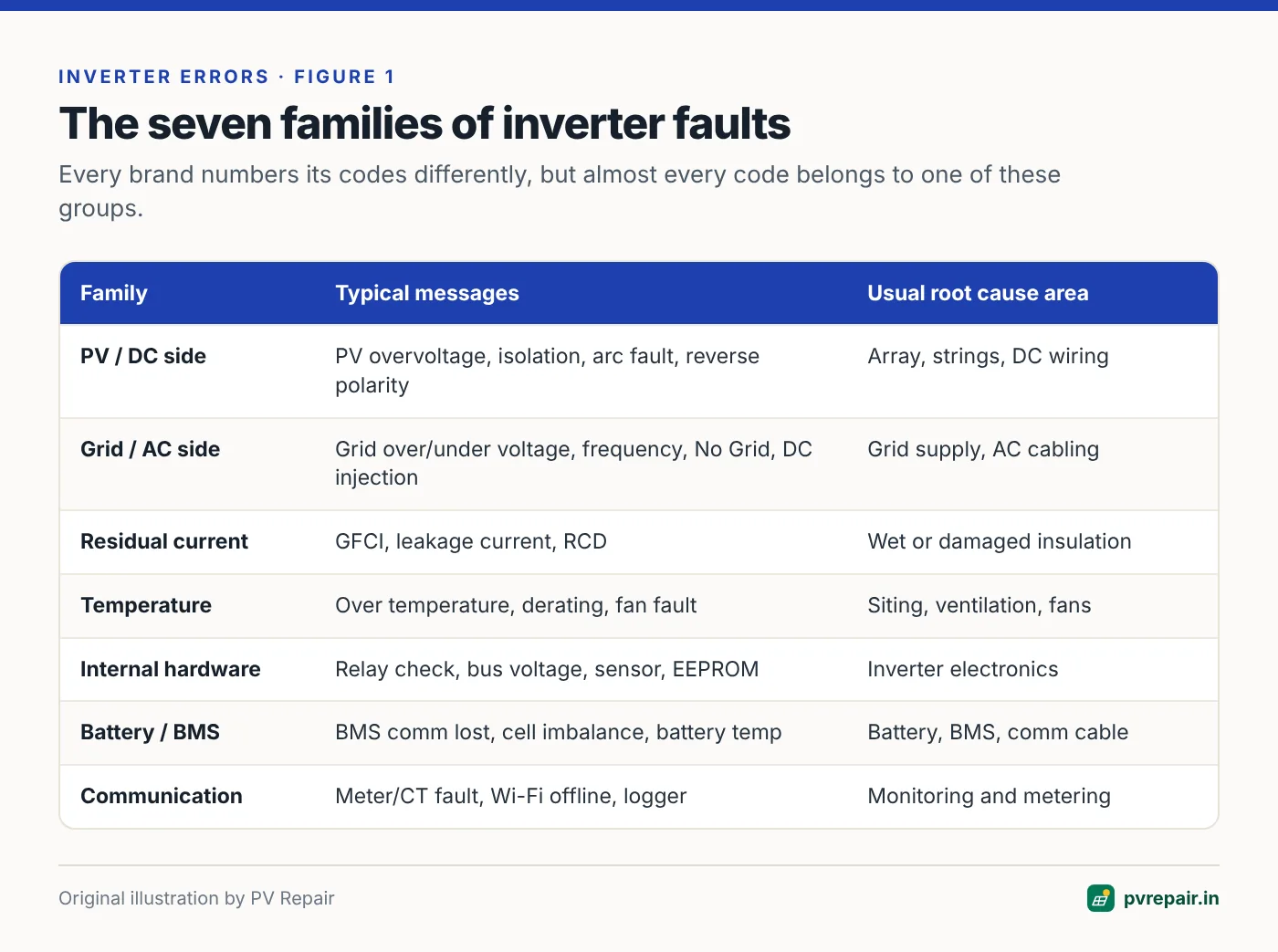
PV / DC side faults
These relate to the solar array and the DC wiring:
- PV overvoltage — string voltage above the inverter's maximum. Often appears on cold, bright mornings. Potentially damaging; see PV overvoltage.
- PV undervoltage / low PV — not enough voltage to start; usually harmless at dawn and dusk.
- Isolation / Riso low — insulation resistance below threshold. See isolation faults.
- Reverse polarity / PV reverse — a string connected the wrong way round. Serious — isolate immediately.
- Arc fault — the inverter has detected the electrical signature of a DC arc. Serious — see DC arc faults.
- String current abnormal / string mismatch — one string producing much less current than others on multi-string inverters.
Grid / AC side faults
- Grid overvoltage / undervoltage — see voltage trips.
- Grid over-/under-frequency — frequency outside limits; rare on the main grid.
- No grid / grid lost / islanding — see No Grid errors.
- DC injection high — the inverter detects a DC component in its AC output above limits. Usually an internal issue if persistent.
Residual current / leakage
- Residual current high / GFCI / leakage current — see residual current faults.
Temperature
- Over temperature / derating / fan fault — see overheating and derating.
Internal hardware
- Relay check failure — the output relays failed a self-test before connection.
- Bus voltage high / unbalanced — the internal DC link is out of range.
- Sensor / current sensor / HCT fault, EEPROM / memory fault, SPI / internal communication fault.
Occasional single occurrences, especially after a grid disturbance, may clear on their own. Persistent or repeating internal faults usually need manufacturer support.
Battery and BMS (hybrid inverters)
- BMS communication lost, battery overvoltage/undervoltage, battery over-temperature, cell imbalance — see lithium BMS errors and battery not charging.
Communication and monitoring
- Meter communication fault, CT fault, Wi-Fi/logger offline. These rarely stop generation, but can disable export limiting or monitoring — see monitoring offline.
Reading the event log properly
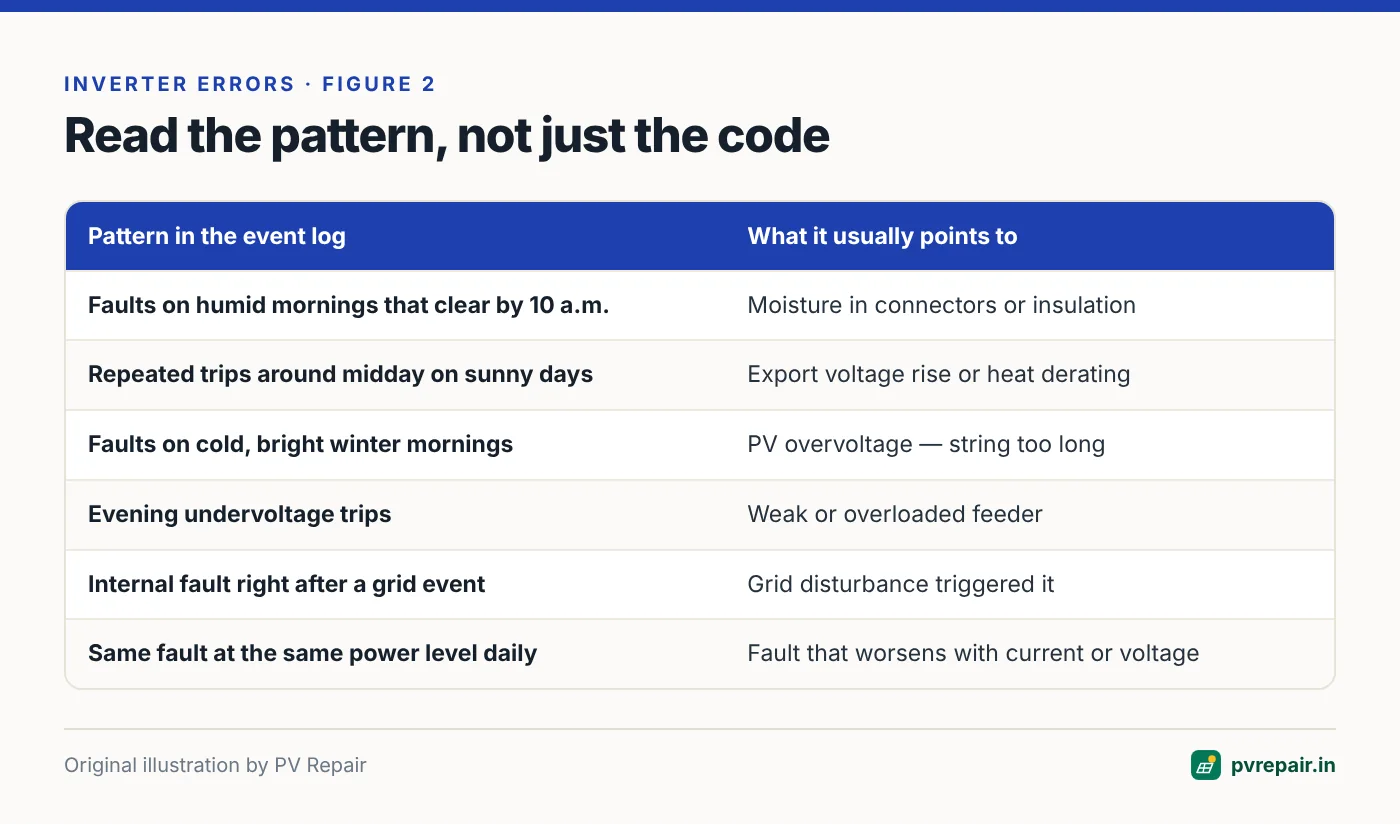
The live screen shows the current state. The event log (or history, alarm list) is far more useful because it shows the pattern over time. On most inverters you can access it from the front panel menu, the installer app, or the cloud monitoring portal.
When you read the log, note:
- The exact code and text. Write it down exactly, including any sub-code.
- Start and end times. A fault that lasts seconds is different from one that lasts hours.
- Frequency. Once a month, once a day, or every few minutes?
- Time of day. Morning (dew, cold, start-up checks), midday (heat, high export, voltage rise), evening (grid voltage dips).
- Weather. Rain, humidity, very cold mornings, storms.
- What happened just before. A grid fault right before an internal fault often means the internal fault was triggered by the grid event.
Screenshot everything
When you contact an installer or manufacturer, send screenshots of the event log covering several days, not just the latest error. Pattern information often lets support staff diagnose remotely without a site visit.
Deciding how urgent a fault is
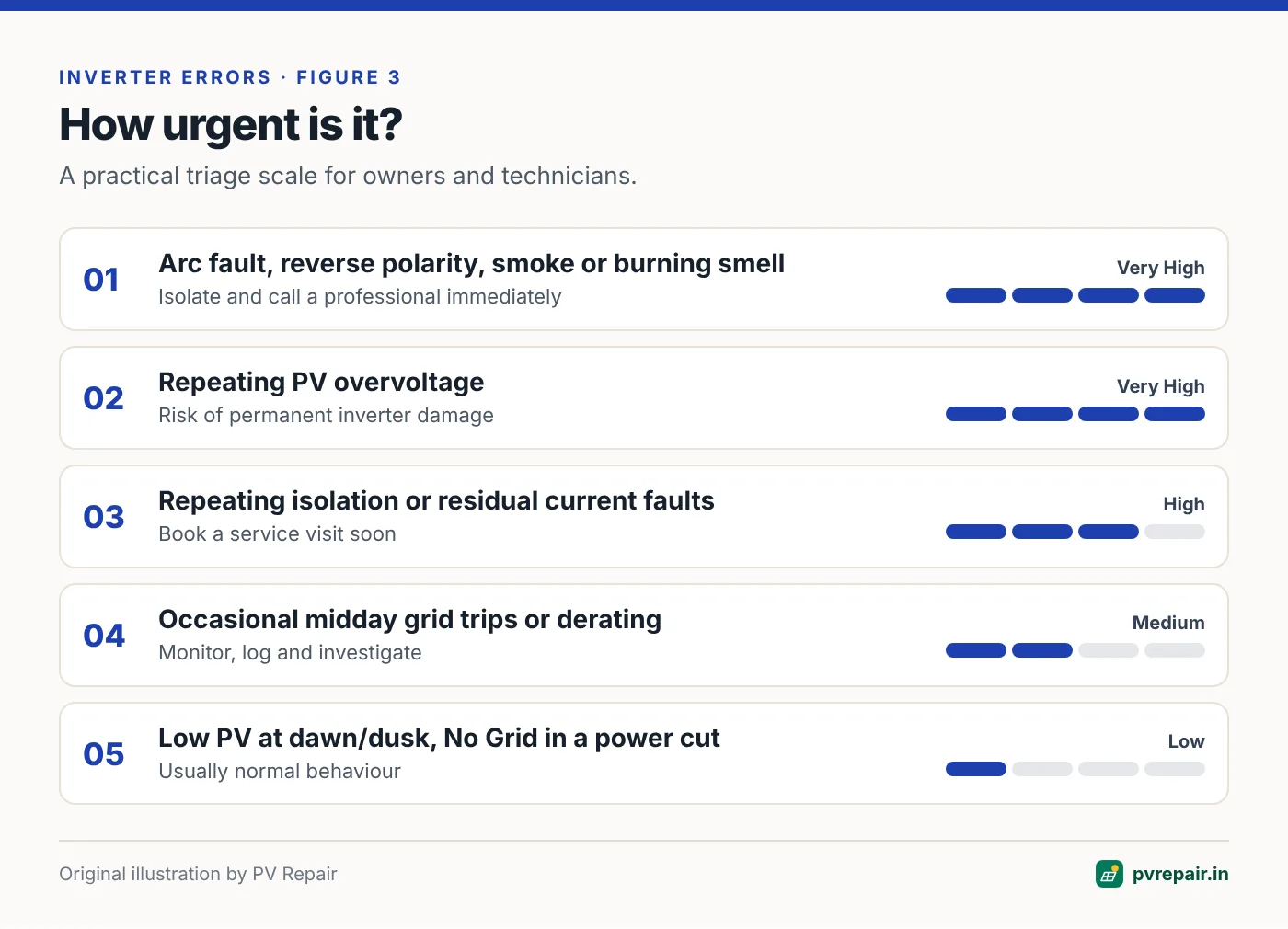
Not every fault needs a technician the same day. Here's a practical way to triage:
- Isolate and call a professional immediately: arc fault, reverse polarity, smoke, burning smell, visible damage, PV overvoltage that repeats, or any fault accompanied by heat or noise.
- Book a service visit soon: repeating isolation or residual current faults, a dead string, internal hardware faults that recur, fan faults.
- Monitor and investigate: occasional grid trips during the day, derating on very hot afternoons, single communication drop-outs.
- Usually normal: low PV voltage at dawn or dusk, No Grid during a confirmed power cut.
What you can safely check yourself
As a system owner, without opening any enclosure, you can:
- Read and photograph the inverter display and event log.
- Check whether isolators and breakers are on.
- Look for obvious damage, smoke marks, rodent nests, loose cables and shading changes.
- Compare today's generation with a similar day last week.
- Note weather conditions when faults occur.
Leave everything that involves opening the inverter, combiner boxes or distribution boards, or disconnecting DC connectors, to a qualified technician.
Where to find the right manual
Search the manufacturer's website for your exact model number (on the side label) and download the user and installation manuals. They contain the fault code table with recommended actions. Many manufacturers also publish separate troubleshooting guides and firmware release notes, which can mention known issues and fixes.
A worked example: decoding an unfamiliar code
Suppose you're called to a site with an inverter brand you've never worked on. The app shows a short numeric code and the words "PV insulation abnormal". The owner says generation has been missing on some mornings.
- Identify the family. "Insulation" places this in the PV/DC family — the inverter's pre-connection Riso check.
- Check the event log pattern. The log shows the code appearing between 6:30 and 9:00 a.m. on several days, always clearing before 10 a.m., with more events in the week of heavy rain.
- Form a hypothesis. Morning-only, rain-correlated insulation faults point to moisture ingress at a weak point — connectors, a cable abrasion or a cracked backsheet.
- Confirm with the manual. The manufacturer's table confirms the code means insulation resistance below threshold and recommends checking PV-to-earth insulation.
- Test. An insulation test on a damp morning shows one string much lower than the others. Splitting that string finds a connector half-full of water.
The specific code number turned out to be the least important piece of information. The family, the timing and the weather pattern did most of the work.
Keep a fault log for each site
For installers and O&M teams, a simple fault log per site saves time over the life of a system. Record the date, code and message, weather, what was checked, what was found, and what was done. Over several years this shows whether a site has a recurring weakness — the same string, the same enclosure, the same season — and gives you evidence for warranty claims and for conversations with the DISCOM about grid quality.
Homeowners can do a lighter version: a note on the phone with screenshots and dates whenever the app shows an alarm. It makes a service visit much faster.
Firmware updates and fault codes
Manufacturers regularly release firmware updates that change protection behaviour, fix false alarms, add grid profiles or improve fault reporting. If a fault looks like a known nuisance trip — for example, a residual current trip on a large, healthy array — ask the manufacturer whether a firmware update addresses it. Updates should be applied by the installer or through the manufacturer's official tools, and grid protection settings must remain compliant with your DISCOM's approval after the update.
Codes that are often misunderstood
- "PV1/PV2 voltage low" at dawn or dusk isn't a fault — it's the inverter waiting for enough voltage.
- "Grid lost" during a power cut is correct anti-islanding behaviour, not a defect.
- "Derating" on hot afternoons is protective, but if it starts at moderate temperatures, it's worth investigating siting and ventilation.
- "Meter communication fault" often doesn't stop generation, but it can disable zero-export control — important where export limits apply.
- "Fan fault" can look minor but leads to chronic overheating if ignored.
Frequently Asked Questions
Do all inverter brands use the same error codes?
No. Each manufacturer has its own numbering and wording. However, the underlying faults are similar because inverters meet the same safety and grid standards. Identify the category and confirm the exact meaning in your model's manual.
Can I clear an inverter fault by switching it off and on?
Many faults clear on their own when the condition goes away. Some, like arc faults or certain internal faults, require a manual reset. Repeatedly resetting without understanding the cause can be dangerous, especially for arc, polarity and overvoltage faults.
Why does my inverter show a different message in the app than on its screen?
Monitoring apps often translate codes into simplified messages, and sometimes the app's naming differs from the manual's. Use the code number, when available, to look up the exact meaning.
Should I worry about a fault that only appeared once?
A single short event — especially a grid voltage or frequency trip — is usually not a concern. Watch for repeats. Faults that recur, worsen or appear alongside generation loss deserve investigation.
What information should I give my installer when reporting a fault?
The inverter model and serial number, the exact error code and message, screenshots of the event log covering several days, the times and weather when faults occurred, and any changes made to the system recently.
Related guides
PV Overvoltage Error: When String Voltage Exceeds Your Inverter's Limit
Why PV overvoltage alarms appear on cold, bright mornings, how to calculate maximum string voltage with temperature correction, and how to fix an oversized string before it damages the inverter.
Solar Inverter Not Turning On? A Systematic Diagnosis From Panels to Display
Blank screen, no LEDs or stuck on "Waiting"? Work through the DC supply, start-up voltage, isolators, fuses and internal faults in the right order to find why your solar inverter won't start.
Residual Current (RCD / GFCI) Fault on Grid-Tie Inverters Explained
What a residual current, leakage current or GFCI fault on a solar inverter means, how it differs from an isolation fault, and how to find wet cables, damaged insulation and nuisance-tripping RCDs.