Solar Monitoring Offline? Fixing Wi-Fi Dongle, Data Logger and App Problems
Why solar inverter monitoring goes offline — router changes, 2.4 GHz vs 5 GHz Wi-Fi, weak signal, power cuts, server and account issues — and a step-by-step method to reconnect Wi-Fi sticks, Ethernet loggers and 4G dongles.
Your solar app says "Offline", "Disconnected" or "No data since…" — and the last data point was days or weeks ago. It's one of the most common support questions in residential solar, and while it doesn't usually mean your system has stopped generating, it does mean you've lost visibility. Without monitoring, you won't notice a tripped inverter, a dead string or creeping soiling losses until your electricity bill tells you.
This guide explains how inverter monitoring works, why it goes offline, and how to bring it back.
Quick answer
Check the inverter itself first — if its screen shows it's generating, the system is fine and only monitoring is affected. The most common causes are a changed Wi-Fi name or password, a new router, a router broadcasting only 5 GHz or a combined band the dongle can't join, weak signal at the inverter location, and the dongle or logger losing its configuration after a power event. Reconfigure the Wi-Fi stick using the manufacturer's app or its local access-point mode, improve signal, or switch to Ethernet or 4G where Wi-Fi is unreliable.
How inverter monitoring works
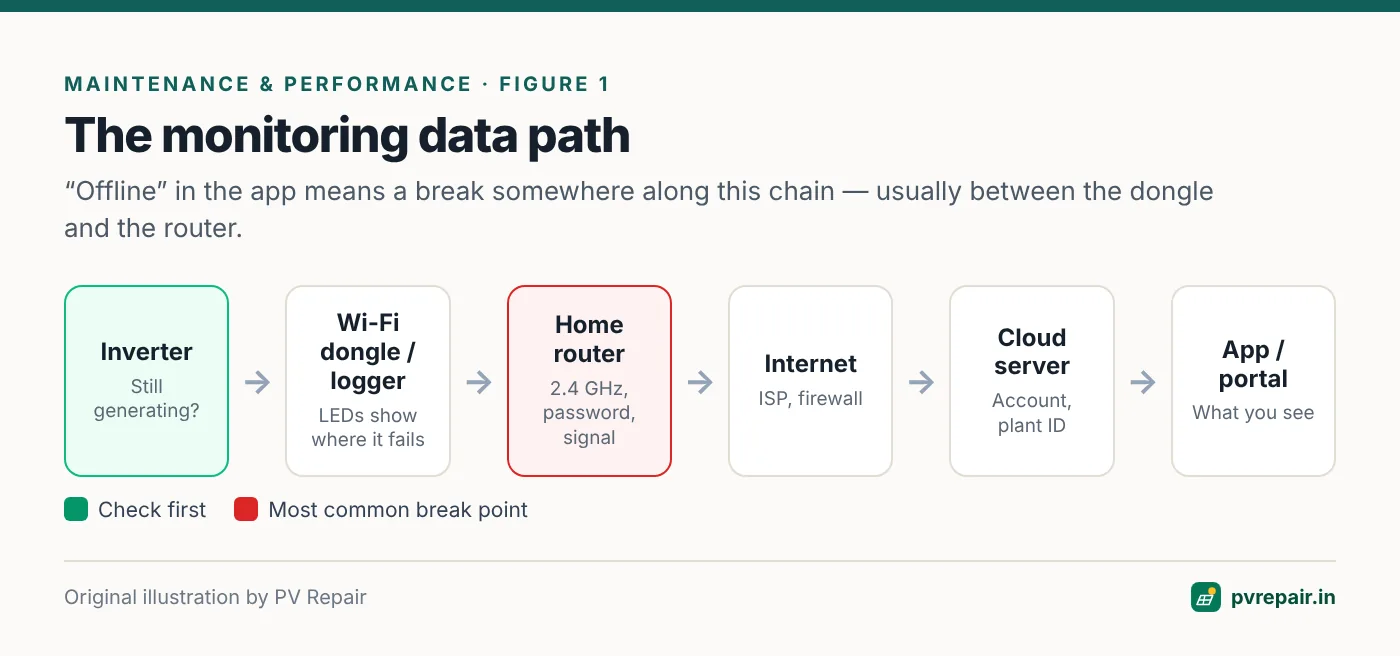
Most residential inverters send data through a small communication module — often a plug-in "Wi-Fi stick" or "dongle" on the bottom of the inverter, sometimes built in. Larger systems use a separate data logger connected to one or more inverters by RS485 or Ethernet. The data path is:
- The inverter measures its own data (power, energy, voltages, faults).
- The dongle or logger reads that data and connects to your Wi-Fi router (or via Ethernet or a 4G SIM).
- The router sends it over the internet to the manufacturer's cloud server.
- You view it in the app or web portal.
A break anywhere in that chain shows as "offline" in the app.
First: is the system actually generating?
Before troubleshooting monitoring, check the inverter's own display or status LEDs during daylight. If it shows normal operation and power output, your system is producing; only the data link is broken. If the inverter is dark or showing a fault, deal with that first — see inverter not turning on.
Also check your net meter's export register or your bill — they're independent evidence of generation. See net meter problems.
Common causes
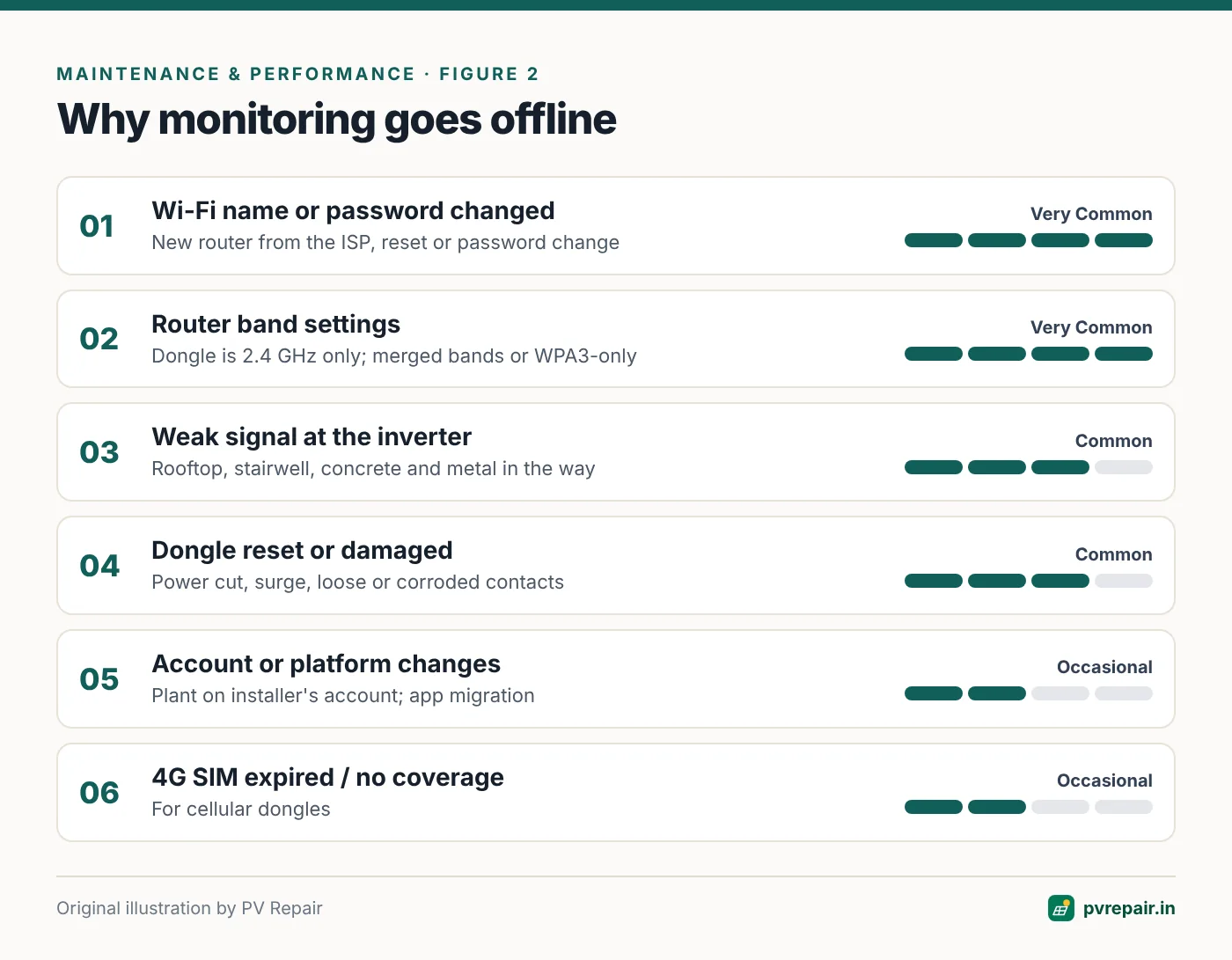
Wi-Fi name or password changed
The most common cause by far. Your internet provider replaced the router, someone changed the password, or the router was reset. The dongle keeps trying to join the old network and fails.
Router band and security settings
Most inverter Wi-Fi dongles support 2.4 GHz only. Many modern routers combine 2.4 GHz and 5 GHz under one network name ("band steering"), which some dongles can't handle, or may have 2.4 GHz disabled. Some dongles also don't support WPA3-only security, hidden SSIDs, or special characters and very long passwords.
Weak signal at the inverter
Inverters are often mounted on rooftops, in stairwells, on outer walls or inside metal enclosures — far from the router, with concrete slabs and metal in the way. The dongle may connect intermittently or not at all.
Power events and dongle faults
Grid outages, surges and lightning can reset or damage dongles and loggers. Some lose their Wi-Fi configuration after a reset. Dongles that aren't fully seated in their port, or have corroded contacts, drop out.
Router-side issues
DHCP address pools exhausted, MAC filtering, parental controls, firewall rules, or an ISP blocking certain ports can prevent the dongle from reaching the cloud.
Account and platform issues
The plant was registered under the installer's account and never transferred; the manufacturer migrated to a new app or platform; the dongle serial wasn't added to your plant; or there's a temporary server outage.
4G dongle issues
For 4G dongles: an expired SIM plan, no data balance, poor mobile coverage, or an APN setting issue.
Step-by-step fix
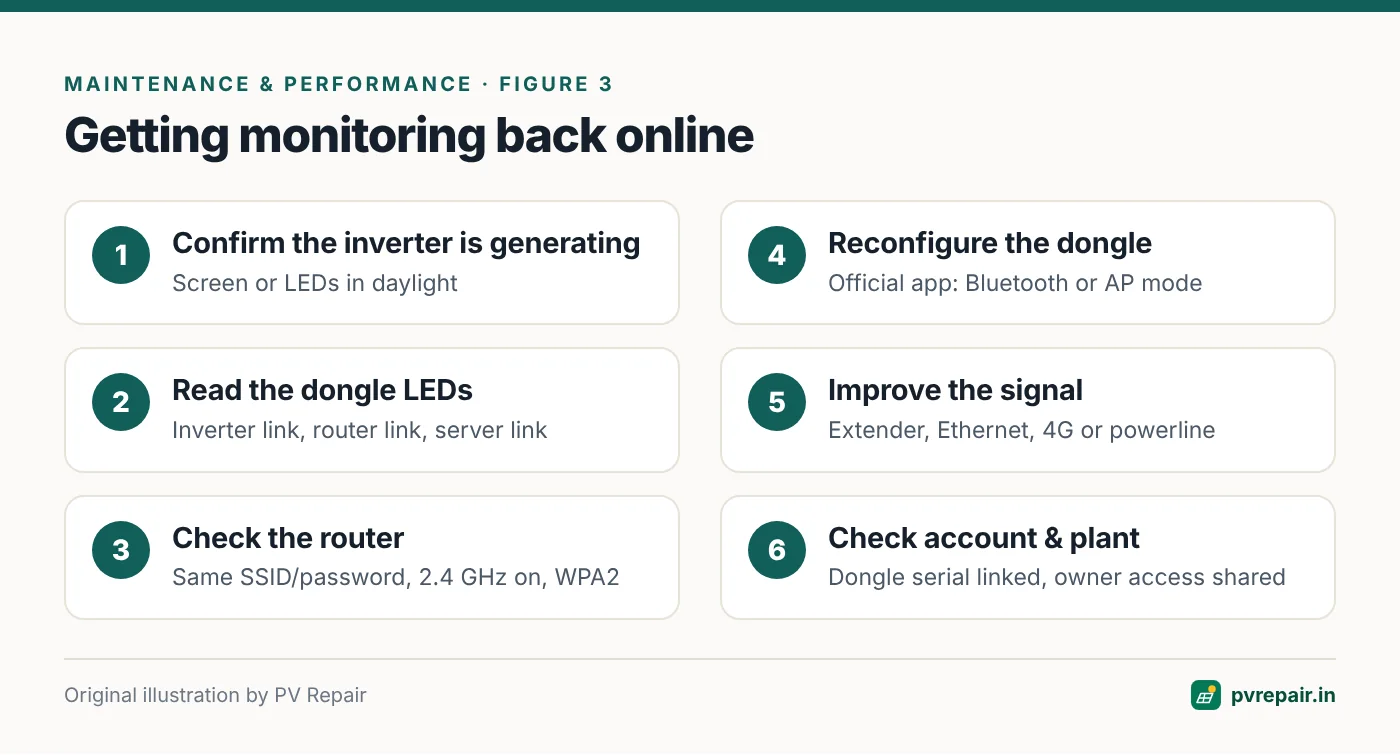
Step 1: Check the dongle's status LEDs
Most dongles have LEDs indicating power, connection to the inverter, connection to the router, and connection to the server. The manual explains the patterns. This tells you where in the chain the problem is.
Step 2: Check your router
- Is the Wi-Fi name and password the same as when monitoring last worked?
- Is a 2.4 GHz network enabled? If your router merges bands, try creating a separate 2.4 GHz network name (many routers allow this) for the dongle.
- Is security set to WPA2 (or WPA2/WPA3 mixed)?
- Are other devices online?
Step 3: Reconfigure the dongle
Use the inverter manufacturer's official app. Typical methods:
- Bluetooth configuration via the app (on newer dongles).
- Access-point (AP) mode: the dongle broadcasts its own Wi-Fi network (often named after its serial number). Connect your phone to it, open the app or a local web page, and enter your home Wi-Fi details.
- Reset button on the dongle to return it to configuration mode — check the manual for the press duration.
After configuration, wait several minutes for the dongle to connect to the router and server, and for data to appear in the app.
Step 4: Improve the signal
Check Wi-Fi signal strength at the inverter with your phone. If it's weak:
- Add a Wi-Fi extender or mesh node near the inverter (outdoors-rated if needed).
- Use the dongle's Ethernet option, or an Ethernet logger, with a cable from the router.
- Consider a 4G dongle where available and reliable.
- For rooftop inverters, a powerline adapter can carry internet over the building's electrical wiring — test before relying on it.
Step 5: Check the account and plant setup
Log in to the monitoring portal. Is the plant present? Is the dongle's serial number linked to it? If the installer created the plant, ask them to share or transfer it to your account. If the manufacturer migrated to a new app, follow their migration instructions.
Step 6: Power-cycle or replace the dongle
Power-cycle the inverter (following the safe shutdown procedure in the manual) to reset the dongle. If the dongle's LEDs show no power or no communication with the inverter, re-seat it or contact the installer — the dongle may need replacing.
For commercial systems: loggers and RS485
Commercial systems often use a data logger connected to inverters over an RS485 daisy chain. Common problems include wrong Modbus addresses (two inverters with the same address), incorrect baud rate, missing termination resistors at the end of the bus, reversed A/B wires, and damaged cables. An offline logger means the whole site disappears; an offline inverter on the bus means a missing device. Check addressing and wiring systematically.
Make monitoring more robust
- Use a dedicated 2.4 GHz network name for solar and IoT devices, and don't change its password without reconfiguring the dongle.
- Put the router (or a mesh node) close enough to the inverter for a strong signal.
- Keep a note of the dongle's serial number, app login details, and plant ID.
- Set up email or app alerts for "offline" and "zero generation" so you know within a day.
- Ask your installer to give you owner access to the plant in the monitoring portal at handover.
Understanding gaps and data quality
Even when monitoring is online, the data isn't perfect. Keep these points in mind when you use it to judge your system:
- Upload intervals are typically every 5–15 minutes. Short events between uploads may not appear.
- Gaps after a Wi-Fi outage show as zero generation on some platforms, which makes a day look worse than it was. Use the inverter's lifetime energy counter to check the true total.
- Rounding and time zones can shift daily totals slightly, especially around midnight.
- Consumption data depends on a correctly installed CT or smart meter; if consumption looks wrong, the CT may be on the wrong cable or reversed.
- Comparisons with the net meter should be done over a month or more, because meter and inverter clocks and reading times differ.
Security and access
Treat your monitoring account like any other online account. Use a strong, unique password, keep the app updated, and don't share your login publicly. If your installer manages your plant on their account, ask them to give you owner or viewer access rather than sharing their credentials. When you sell a property, transfer or remove the plant from your account so the new owner can take over cleanly. Avoid exposing a data logger's local web interface directly to the internet.
Frequently Asked Questions
Does monitoring offline mean my solar isn't working?
Not necessarily. In most cases the system keeps generating and only the data connection is lost. Check the inverter display to be sure.
Why can't my solar Wi-Fi dongle find my 5 GHz network?
Most inverter dongles only support 2.4 GHz Wi-Fi. Enable or create a separate 2.4 GHz network on your router for the dongle.
I changed my router. How do I reconnect the solar monitoring?
Put the dongle into configuration mode (via the manufacturer's app, Bluetooth or access-point mode) and enter the new Wi-Fi name and password. Check the manual for your dongle model.
Will I lose my generation data while monitoring is offline?
Many inverters and dongles store some data locally and upload it when the connection returns, but storage is limited. Long outages often leave gaps. The inverter's lifetime energy counter isn't affected.
Can I monitor my solar without Wi-Fi?
Yes. Options include Ethernet connections, 4G dongles, or simply reading the inverter's display. Some inverters also offer local Bluetooth monitoring through the app.
Related guides
Annual Solar PV Maintenance Checklist for Homes and Commercial Rooftops
A complete, practical annual maintenance checklist for rooftop solar in India — visual inspection, modules, structure, DC and AC wiring, inverters, earthing, batteries, monitoring and documentation — with what owners can do and what needs a technician.
Solar System Producing Less Power Than Expected? A 10-Step Diagnosis
How much should your rooftop solar system really generate in India, and how to find out why it's producing less — from weather and soiling to shading, inverter clipping, string faults, degradation and monitoring errors.
Net Meter Problems with Rooftop Solar: Export Not Recording, Wrong Readings and Billing Issues
How bi-directional net meters work, how to read import and export registers, and how to troubleshoot export not recording, unexpectedly high bills, wrong CT polarity, and meter-related inverter faults with your DISCOM.