Lithium Battery BMS Errors in Hybrid Solar Systems: Communication, Imbalance and Protection Trips
How the battery management system (BMS) in lithium solar batteries works with hybrid inverters, what common BMS alarms mean — communication loss, cell overvoltage, imbalance, temperature — and how to troubleshoot them safely.
Lithium iron phosphate (LiFePO4) batteries have become the standard for new hybrid and off-grid solar systems in India. They last far longer than lead-acid, tolerate deeper discharge and need no maintenance. But they bring a new layer of complexity: the battery management system (BMS), and its communication with the hybrid inverter. When something goes wrong, you see alarms like BMS Communication Lost, Battery Fault, Cell Overvoltage, Cell Imbalance or Battery Temperature High — and the inverter may stop charging, stop discharging, or shut the battery off entirely.
This guide explains what the BMS does, how it talks to the inverter, what the common alarms mean, and a safe troubleshooting sequence.
Quick answer
The BMS monitors every cell's voltage and temperature and the pack current, and protects the battery by limiting or stopping charge and discharge. In a hybrid system, it usually tells the inverter its charge and discharge limits over CAN or RS485. Most BMS errors are caused by communication setup (wrong protocol, cable pin-out, termination, or battery address), temperature limits, cell imbalance in packs that rarely reach full charge, or a deep-discharged battery in protection mode. Check communication settings and cables first, then read the BMS data for cell voltages and temperatures.
What the BMS does
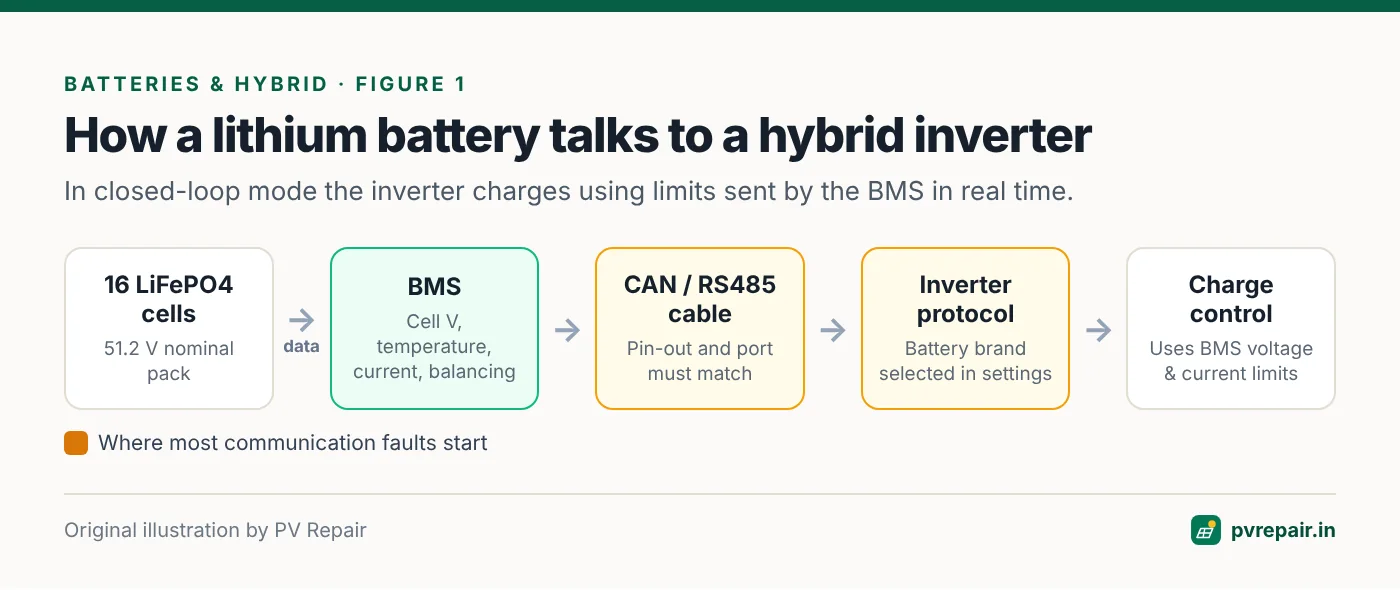
A lithium battery pack is made of many cells connected in series (for example, 16 LiFePO4 cells for a nominal 51.2 V "48 V" battery) and sometimes in parallel. Lithium cells are damaged if any single cell goes above or below its safe voltage window, or if charged when too cold or too hot. The BMS:
- Measures each cell's voltage, pack voltage, pack current and temperatures at several points.
- Protects by opening its internal switches (MOSFETs or a contactor) to stop charging, discharging or both, when any limit is exceeded.
- Balances cells — usually passive balancing that bleeds a little energy from the highest cells near the top of charge, so all cells reach full together.
- Estimates state of charge (SOC) and state of health (SOH).
- Communicates with the inverter: the maximum charge voltage, charge current limit, discharge current limit, SOC, alarms and warnings.
Closed-loop communication
In a properly integrated ("closed-loop") hybrid system, the inverter takes its charging limits from the BMS in real time. This is the safest and most accurate arrangement: the battery tells the inverter exactly what it can accept, adjusting for temperature and cell conditions.
In an "open-loop" arrangement (no communication), the inverter charges according to its own voltage settings, and the BMS acts only as a last-resort protector. It works, but SOC estimates are less accurate and protection trips are more likely.
Common BMS alarms and what they mean
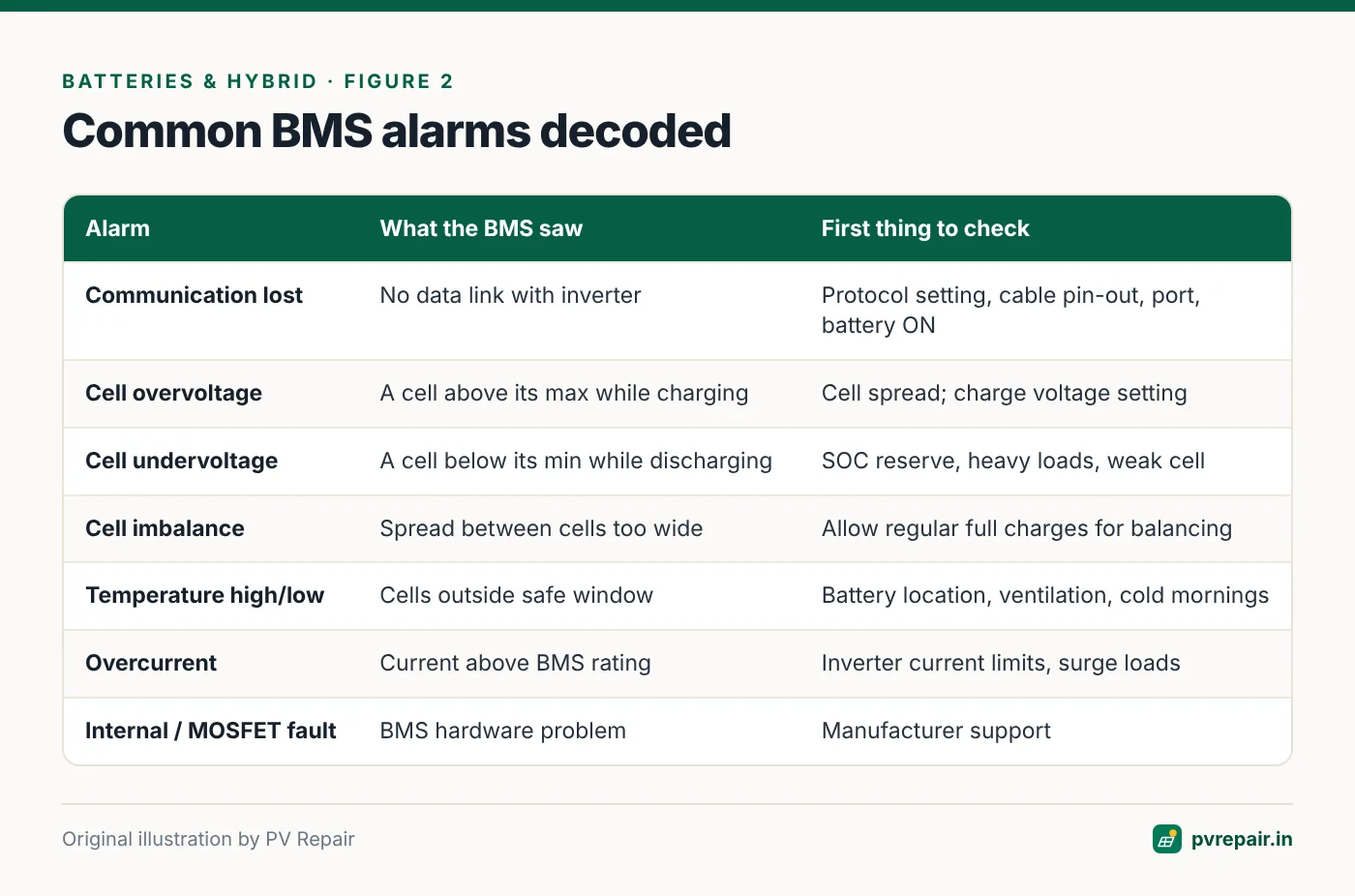
BMS communication lost / battery communication fault
The inverter isn't receiving data from the BMS. Common causes:
- Wrong protocol selected in the inverter. Many inverters support several battery brand protocols over CAN or RS485, and one must be chosen to match the battery. Some batteries also have a DIP switch or setting to select the inverter protocol.
- Wrong cable or pin-out. Battery and inverter communication ports often use RJ45 sockets but with different pin assignments. A standard network cable may not work; you may need the specific cable supplied by the battery or inverter manufacturer.
- CAN vs RS485 port confusion. Plugging into the wrong port of the battery or inverter.
- Termination or addressing in multi-battery stacks — the master battery must be set correctly and slaves addressed properly (often with DIP switches).
- Battery asleep or switched off. If the battery is off or in deep protection, it won't communicate.
- Firmware incompatibility between battery and inverter versions.
Cell overvoltage / pack overvoltage
One or more cells reached their maximum voltage during charging. The BMS stops charging. Causes:
- Cell imbalance — the highest cell reaches its limit before the pack is full.
- Charge voltage set too high in open-loop mode.
- Regenerative or sudden load changes (less common in solar systems).
Cell undervoltage / pack undervoltage
A cell dropped below its minimum during discharge. The BMS stops discharging. Causes: deep discharge, high loads at low SOC, imbalance (the weakest cell hits its limit first), or very low temperatures.
Cell imbalance / voltage difference high
The spread between the highest and lowest cell voltages exceeds a threshold. Imbalance develops in packs that rarely reach a full charge (so passive balancing never has time to work), and in packs with a weak or ageing cell.
Temperature high / low
The BMS limits or stops charging or discharging outside its temperature window. LiFePO4 cells generally must not be charged below about 0 °C, and charging and discharging currents are often reduced at high temperatures. Batteries installed in hot rooms or in direct sun often hit high-temperature limits in Indian summers.
Overcurrent (charge or discharge)
Current exceeded the BMS limit — for example, a large load surge exceeding the battery's discharge rating, or an inverter set to charge at more current than the battery allows (common in open-loop setups or when several batteries are configured as if they were one).
Internal fault / MOSFET fault / precharge failure
Hardware problems in the BMS. Precharge failure can occur when connecting a battery to an inverter with large uncharged input capacitors without the correct start-up procedure. Internal faults usually need the battery manufacturer's support.
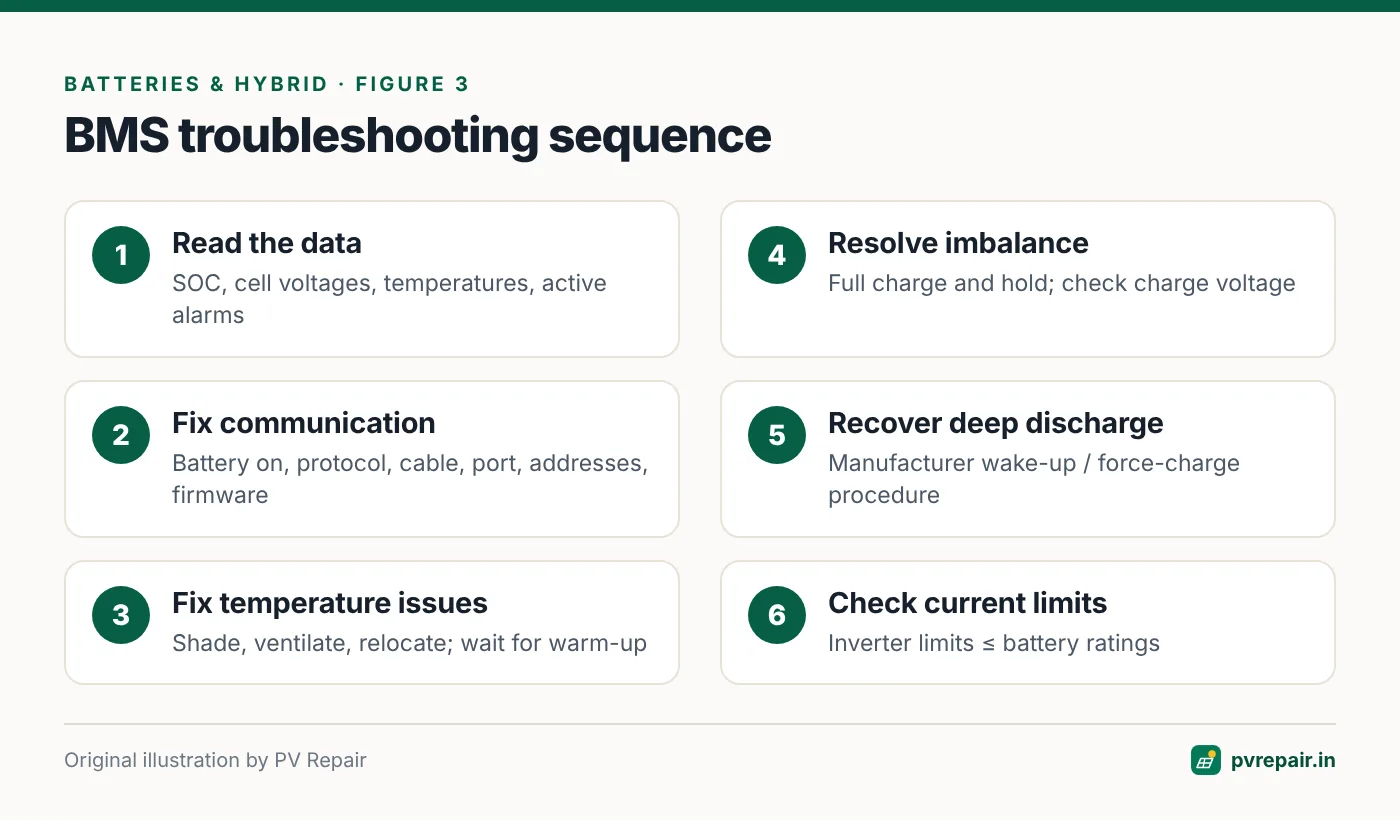
Troubleshooting sequence
Battery safety
Lithium battery banks can deliver very high short-circuit currents. Use insulated tools, remove jewellery, and never short battery terminals. Don't open battery modules — there are no user-serviceable parts inside, and opening them may void the warranty.
1. Read the data first
Use the inverter display or app and, if available, the battery manufacturer's PC software or app to read: SOC, pack voltage, each cell voltage, temperatures, current, and active alarms and protection flags. This tells you whether you're dealing with communication, temperature, imbalance or a hardware fault.
2. Communication faults
- Confirm the battery is ON and awake (indicator LEDs, power button, breaker).
- Check the inverter's battery type/protocol setting against the compatibility list from the inverter or battery manufacturer.
- Use the correct communication cable and port (CAN or RS485), and check the pin-out. Re-seat connectors.
- For multiple batteries, verify the master/slave settings and addresses (DIP switches) per the manual, and the link cables between batteries.
- Power-cycle in the order the manual recommends (often battery first, then inverter).
- Check firmware versions and update if the manufacturers recommend it.
3. Temperature faults
Check the battery's temperature readings. Relocate batteries out of direct sun and hot rooms, improve ventilation, and keep the battery's operating temperature within the datasheet range. For cold-weather charge blocks, the battery may need to warm up before it accepts charge.
4. Imbalance and cell voltage faults
- Let the battery reach a full charge and hold at the top for a period so the BMS can balance. Some systems have a periodic "full charge" setting for this purpose.
- Check that the charge voltage (in open-loop mode) matches the battery datasheet.
- If imbalance persists or worsens, or one cell is consistently far from the others, contact the battery manufacturer — a weak cell may need warranty attention.
5. Deep discharge protection
If the battery has shut itself off after deep discharge and won't communicate, follow the manufacturer's recovery procedure. Some batteries can be woken by a button or by applying charging voltage from the inverter's "force charge" or "battery activation" function. Don't attempt improvised recovery with external chargers unless the manufacturer specifies it.
6. Overcurrent
Check that the inverter's maximum charge and discharge current settings don't exceed the battery's ratings (multiplied by the number of batteries in parallel, if supported). Check for large surge loads such as motors or pumps.
Commissioning checklist for lithium and hybrid systems
Most BMS problems can be prevented on the day the system is commissioned:
- Confirm the battery model and firmware appear on the inverter manufacturer's compatibility list.
- Record the protocol selected in the inverter, the communication port used, and any DIP switch or address settings on the battery.
- Label the communication cable at both ends and keep a spare if it's a special pin-out.
- Verify in the inverter app that live BMS data (SOC, voltage, current, temperature and limits) is being received.
- Perform a full charge and check that cell voltages are tightly grouped at the top of charge.
- Set a sensible minimum SOC reserve for discharge.
- Note the ambient temperature range of the battery location and confirm it's within the datasheet range.
Prevention
- Use a verified compatible battery–inverter combination, with closed-loop communication.
- Install the correct communication cable and record the protocol and DIP settings.
- Keep batteries in a cool, ventilated place out of direct sun.
- Set sensible discharge limits (e.g., a minimum SOC reserve) to avoid deep discharge.
- Allow a regular full charge for balancing.
- Update firmware on both battery and inverter when the manufacturers recommend it.
- Monitor cell voltages in the app periodically; growing spread is an early warning.
Frequently Asked Questions
Why does my hybrid inverter show "BMS communication lost"?
Usually because the wrong battery protocol is selected, the communication cable or port is wrong, the battery is off or asleep, or multi-battery addressing is incorrect. Check settings and cables against the manuals.
Can I use a lithium battery without BMS communication?
Many systems allow an open-loop "lithium voltage" mode, but closed-loop communication is safer and more accurate. Use open-loop mode only if both manufacturers support it and you set voltages and currents from the battery datasheet.
What causes cell imbalance in lithium batteries?
Small differences in cell capacity and self-discharge, combined with rarely reaching full charge (so balancing doesn't happen), and ageing or weak cells. Regular full charges help the BMS keep cells balanced.
Is it safe to reset a BMS alarm?
Reset only after understanding the cause. Repeated overvoltage, overcurrent or temperature alarms indicate a condition that needs correcting. Persistent internal faults require manufacturer support.
Why won't my lithium battery charge when it's cold?
LiFePO4 cells can be damaged by charging below about 0 °C, so the BMS blocks or reduces charging at low temperatures. Some batteries include heaters to address this.
Related guides
Solar Battery Not Charging? Charge Controller and Battery Troubleshooting Guide
Step-by-step troubleshooting for solar batteries that won't charge or charge slowly — PV input, MPPT and PWM charge controller settings, battery type and voltage settings, cabling losses, lead-acid sulphation and lithium protection modes.

Best 3D Solar Design Software for Solar EPCs in India (2026 Guide)
An in-depth comparison of the best 3D solar design software for Indian solar EPCs and installers — from fast rooftop 3D modelling and shading to DISCOM drawings, PM Surya Ghar proposals and bills of materials. SolarDraft ranks No. 1, Solar Designer No. 2.
Annual Solar PV Maintenance Checklist for Homes and Commercial Rooftops
A complete, practical annual maintenance checklist for rooftop solar in India — visual inspection, modules, structure, DC and AC wiring, inverters, earthing, batteries, monitoring and documentation — with what owners can do and what needs a technician.