Solar Battery Not Charging? Charge Controller and Battery Troubleshooting Guide
Step-by-step troubleshooting for solar batteries that won't charge or charge slowly — PV input, MPPT and PWM charge controller settings, battery type and voltage settings, cabling losses, lead-acid sulphation and lithium protection modes.
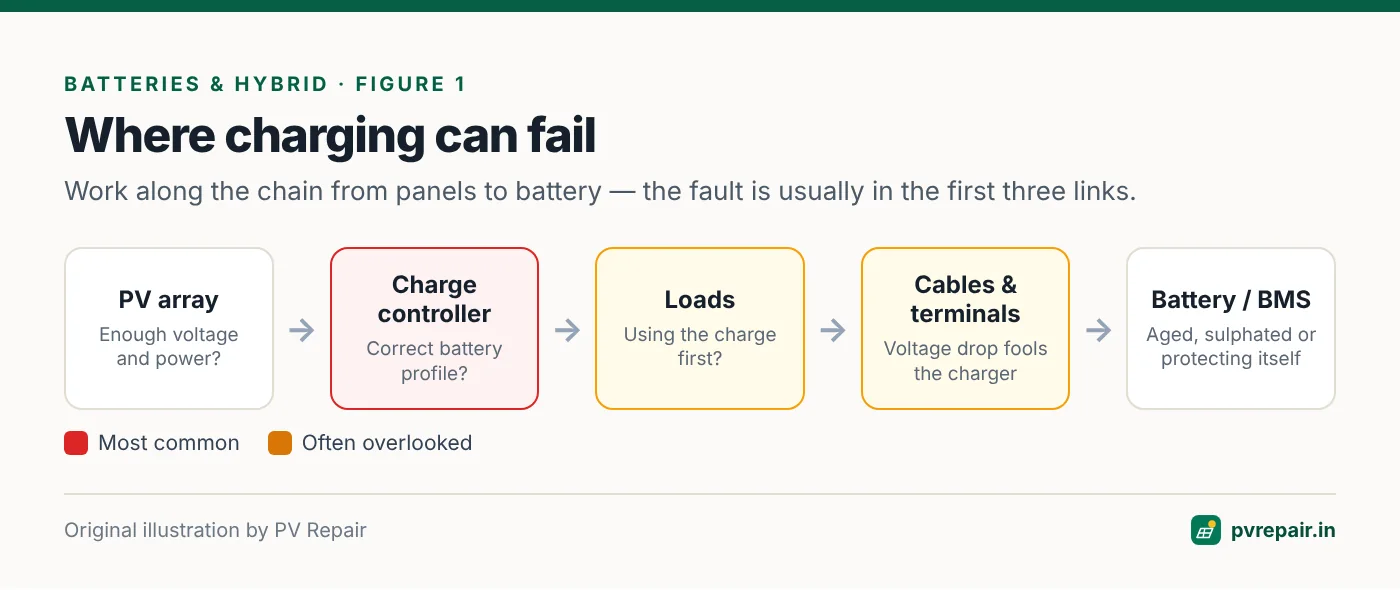
A battery that won't charge — or never seems to reach full — is the most common complaint in off-grid and hybrid solar systems. The cause can be anywhere in the chain: not enough solar input, a charge controller set up for the wrong battery, undersized cables, a battery that has degraded, or a lithium battery management system (BMS) that has stopped charging to protect the cells.
This guide works through the chain logically, from panels to battery. It applies to standalone charge controllers (MPPT and PWM) and to the battery-charging stage of hybrid inverters. For lithium-specific communication and BMS alarms, also see our guide to lithium BMS errors in hybrid systems.
Quick answer
Check in order: (1) Is PV power reaching the charger? (2) Is the charger configured for the correct battery type and voltages? (3) Are loads consuming the charge as fast as it arrives? (4) Is cable voltage drop or a loose terminal fooling the charger? (5) Is the battery itself healthy — or, for lithium, has the BMS blocked charging due to temperature, cell voltage or communication? Most cases are settings, undersized PV, or a battery at the end of its life.
How solar charging works
Solar panels feed a charge controller — either a standalone unit or the charger stage inside a hybrid inverter. The controller converts the PV input to the right voltage and current for the battery and manages charging stages.
- PWM controllers connect the panels to the battery through a fast switch. The panel operates at roughly battery voltage, so the panel voltage must be matched to the battery (e.g., "12 V" panels for 12 V batteries). They're simple and cheap but waste the extra voltage the panel could provide.
- MPPT controllers convert higher PV voltage to battery voltage, tracking the panel's maximum power point. They're more efficient, especially in cold weather and with long cable runs, and allow series strings of panels.
Charging stages (lead-acid)
- Bulk: the controller delivers maximum available current until the battery reaches the absorption voltage.
- Absorption: voltage is held constant while current tapers, letting the battery reach full charge.
- Float: voltage is reduced to a maintenance level to keep the battery full without overcharging.
- Equalisation (flooded lead-acid only, periodically): a controlled overcharge to balance cells and reduce stratification.
Lithium (LiFePO4) charging
LiFePO4 batteries typically charge with a constant-current, constant-voltage profile up to a defined charge voltage, with little or no float. The BMS protects each cell and can stop charging if a cell's voltage or temperature goes out of range. Many hybrid inverters communicate with lithium batteries over CAN or RS485 and take their charge voltage and current limits directly from the BMS.
Step-by-step troubleshooting
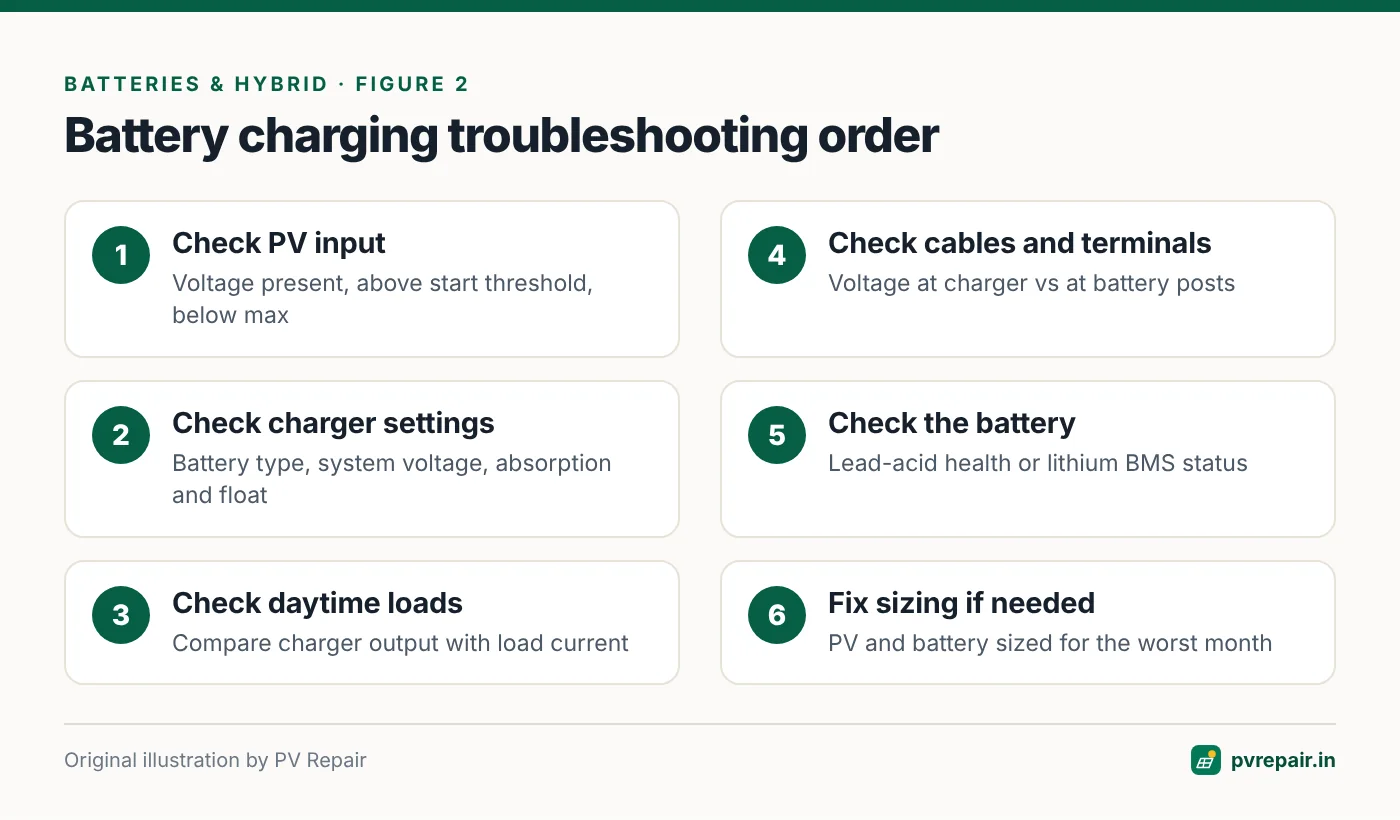
Step 1: Check PV input
- Is the controller seeing PV voltage? Most controllers display PV voltage and current. No PV voltage means a disconnected panel, blown fuse, open breaker or wiring fault — see string testing.
- Is PV voltage high enough? For MPPT controllers, PV voltage must exceed battery voltage by a margin specified by the manufacturer (often several volts) before charging starts. For PWM, the panel's operating voltage must be suitable for the battery.
- Is PV voltage too high? MPPT controllers have a maximum PV input voltage. Exceeding it (often on cold mornings) can stop charging or damage the controller. See PV overvoltage.
- Is the array big enough? An array that's too small for the battery bank and daily loads will never fully charge the battery. In the monsoon and winter, production can drop to a fraction of summer levels.
- Shading and soiling — dirty panels and partial shading reduce charge current. See cleaning.
Step 2: Check charger settings
Wrong settings are one of the most common causes:
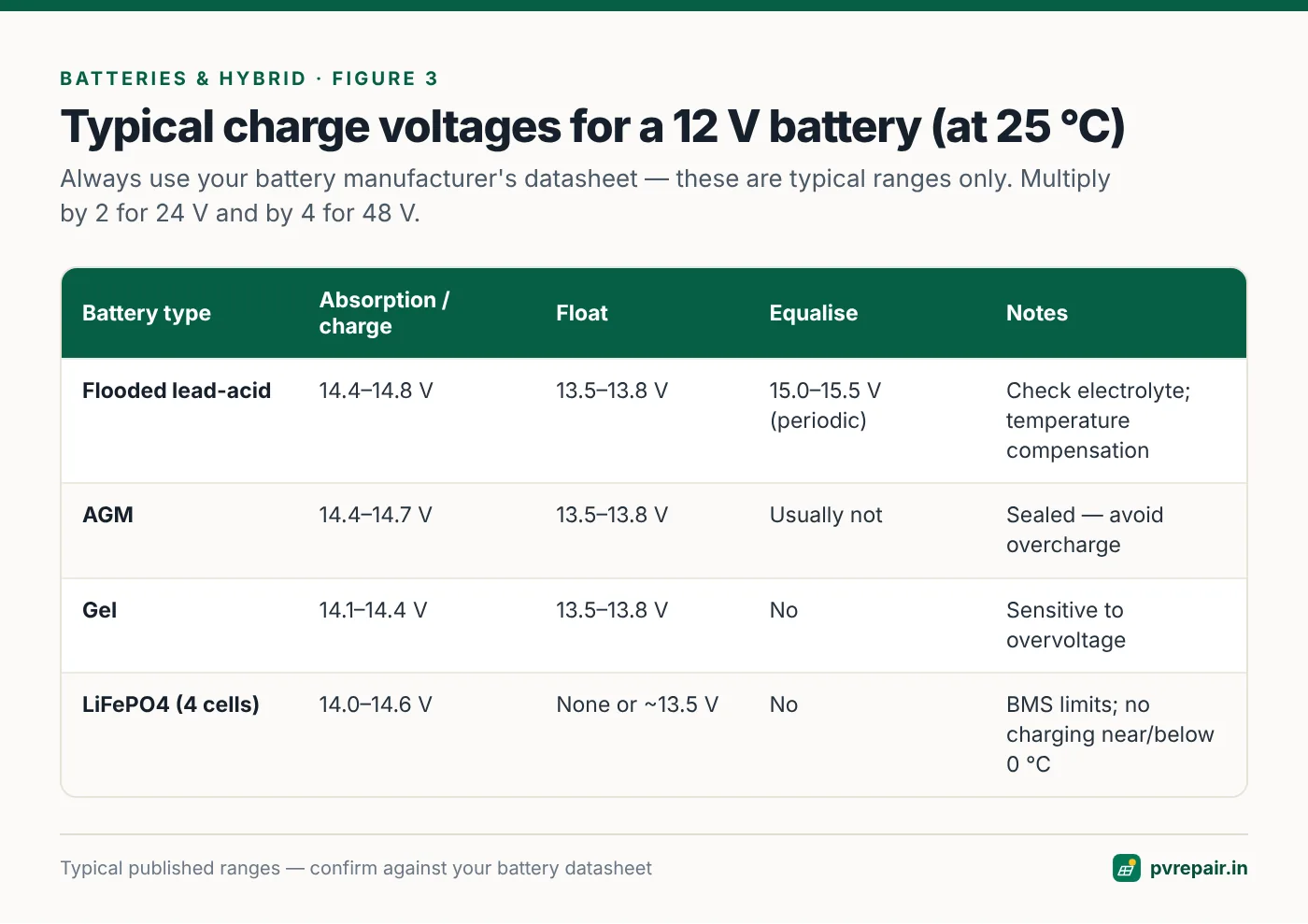
- Battery type — flooded, AGM, gel, or lithium. Each has different voltages. A lithium battery on a lead-acid profile may be overcharged or, more commonly, not fully charged; a lead-acid battery on a lithium profile may be undercharged and sulphate.
- System voltage — 12/24/48 V. Auto-detect sometimes gets it wrong if the battery was very discharged at first connection.
- Absorption, float and equalisation voltages — check against the battery manufacturer's datasheet, not generic values.
- Absorption time — too short and lead-acid batteries never reach full charge.
- Temperature compensation — lead-acid charge voltages should be compensated for temperature. In hot climates, the controller should reduce voltage; without a battery temperature sensor, batteries in hot rooms may be overcharged, and in cool conditions undercharged.
- Charge current limits — set too low and the battery charges slowly.
Step 3: Check loads
If loads (fans, lights, pumps, inverters) are running during the day, the charger's output may be going straight to the loads with little left for the battery. Compare charger output current with load current. A large inverter idling all day also consumes energy.
Step 4: Check cables and connections
Undersized battery cables and loose or corroded terminals cause voltage drop. The controller sees a higher voltage at its own terminals than the battery actually receives, so it moves to absorption or float too early, and the battery never fully charges.
- Measure voltage at the controller's battery terminals and directly at the battery posts while charging. A difference of more than a few tenths of a volt (on a 12 V system) indicates excessive drop.
- Clean and tighten terminals; use correctly sized cables and lugs; keep cable runs short.
- Use a battery voltage sense lead if the controller supports one.
Step 5: Check the battery
Lead-acid:
- Sulphation — batteries left partly discharged for long periods form hard sulphate crystals that reduce capacity and resist charging. Symptoms: voltage rises quickly during charging, then the battery discharges fast.
- Low electrolyte in flooded batteries — check and top up with distilled water as specified.
- Failed cells — a 12 V battery reading around 10.5 V at rest may have a shorted cell.
- End of life — lead-acid batteries have limited cycle lives, shorter in hot climates and with deep discharges.
Lithium:
- BMS protection — the BMS may block charging because of high or low cell temperature (many LiFePO4 batteries must not be charged below about 0 °C, and also limit charging at high temperatures), a cell over its maximum voltage, cell imbalance, or an internal fault.
- Communication — on hybrid systems, if communication between battery and inverter fails, the inverter may stop charging or fall back to conservative limits.
- Deep discharge lockout — some lithium batteries shut down completely if over-discharged and need a wake-up procedure.
See our detailed guide to BMS errors.
Common scenarios
| Symptom | Likely cause |
|---|---|
| Charger shows PV 0 V | Panels disconnected, fuse/breaker open, wiring fault |
| PV voltage present, charge current 0 | PV voltage below start threshold, BMS blocking, controller fault |
| Battery reaches "full" quickly, then runs flat | Sulphated or aged lead-acid; wrong settings; voltage drop |
| Always in bulk, never reaches absorption | PV too small for loads and battery; heavy daytime loads |
| Charges in morning, stops at midday | Overheating controller, high battery temperature limit, PV overvoltage |
| Lithium won't charge in winter mornings | Low-temperature charge protection |
Where the battery lives matters
Battery temperature affects charging, capacity and life more than most owners realise. Lead-acid batteries lose life rapidly at sustained high temperatures — a common rule of thumb is that life roughly halves for every 8–10 °C above 25 °C. Lithium batteries also age faster when hot, and their BMS will limit or stop charging outside its temperature window.
- Keep batteries out of direct sun and away from tin-roofed rooms that heat up in summer.
- Provide ventilation — essential for flooded lead-acid batteries, which release hydrogen during charging.
- Keep batteries off damp floors and away from water ingress.
- Fit a battery temperature sensor where the charger supports one, so charge voltages are corrected automatically.
- Leave access space for inspection, terminal checks and, for flooded batteries, topping up.
Prevention
- Size PV and battery together for your worst month, not your best.
- Configure chargers using the battery manufacturer's datasheet; record the settings.
- Use correct cable sizes and torque terminals properly; check them during maintenance.
- Keep batteries in a ventilated, shaded, moderate-temperature location.
- Avoid leaving lead-acid batteries partly discharged for long periods.
- For lithium, use a battery and inverter combination with verified communication compatibility.
Frequently Asked Questions
Why is my solar battery not charging fully?
Common reasons are too little solar input, wrong charge settings (battery type, absorption voltage or time), daytime loads using the charge, cable voltage drop, or an aged battery. Check each in turn.
What's the difference between PWM and MPPT charge controllers?
PWM controllers connect panels directly to the battery voltage, so panel and battery voltages must be matched. MPPT controllers convert higher panel voltage efficiently to battery voltage, giving more energy, especially in cold conditions and with longer cable runs.
Can I use a lead-acid charge setting for a lithium battery?
It's not recommended. Lithium batteries need specific charge voltages and usually no float or equalisation. Wrong settings can undercharge, overcharge or trigger BMS protection. Use the lithium profile or the battery manufacturer's recommended values.
Why does my lithium battery not charge in the morning?
Many lithium batteries block charging when cell temperature is too low, commonly around 0 °C, and may reduce charge current at low temperatures. Batteries in cold locations may not charge until they warm up.
How do I know if my battery is dead?
For lead-acid, symptoms include voltage that rises quickly during charging and falls quickly under load, a low resting voltage, and bulging or leaking cases. A capacity test or load test confirms it. For lithium, check the BMS data for state of health, cell voltages and alarms.
Related guides
Lithium Battery BMS Errors in Hybrid Solar Systems: Communication, Imbalance and Protection Trips
How the battery management system (BMS) in lithium solar batteries works with hybrid inverters, what common BMS alarms mean — communication loss, cell overvoltage, imbalance, temperature — and how to troubleshoot them safely.

Best 3D Solar Design Software for Solar EPCs in India (2026 Guide)
An in-depth comparison of the best 3D solar design software for Indian solar EPCs and installers — from fast rooftop 3D modelling and shading to DISCOM drawings, PM Surya Ghar proposals and bills of materials. SolarDraft ranks No. 1, Solar Designer No. 2.
Annual Solar PV Maintenance Checklist for Homes and Commercial Rooftops
A complete, practical annual maintenance checklist for rooftop solar in India — visual inspection, modules, structure, DC and AC wiring, inverters, earthing, batteries, monitoring and documentation — with what owners can do and what needs a technician.